Pay stubs
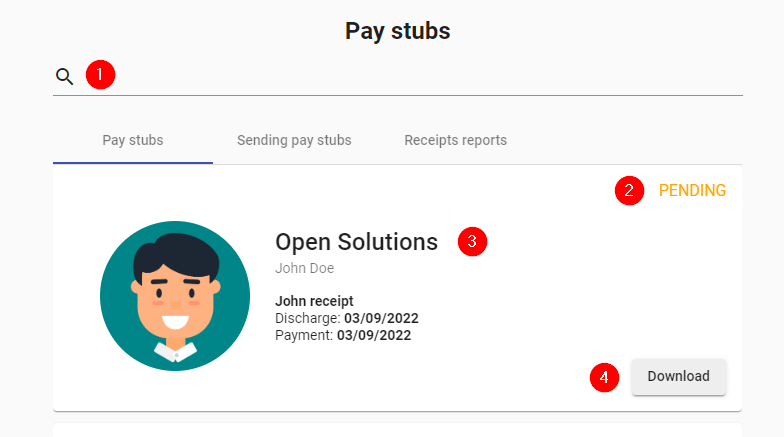
- Search: Allows you to filter among the uploaded receipts.
- Status: Shows the status of the receipt, it can be SIGNED CONFORMED, SIGNED NOT CONFORMED or PENDING.
- Details: Shows the company name, employee's name, receipt name, date, pay date, if the receipt uses digital signature circuit and if the receipt has been signed with discorforming reason.
- Download: Allows you to download the receipt.
- Add: Allows you to upload the receipts of a company of your choice.
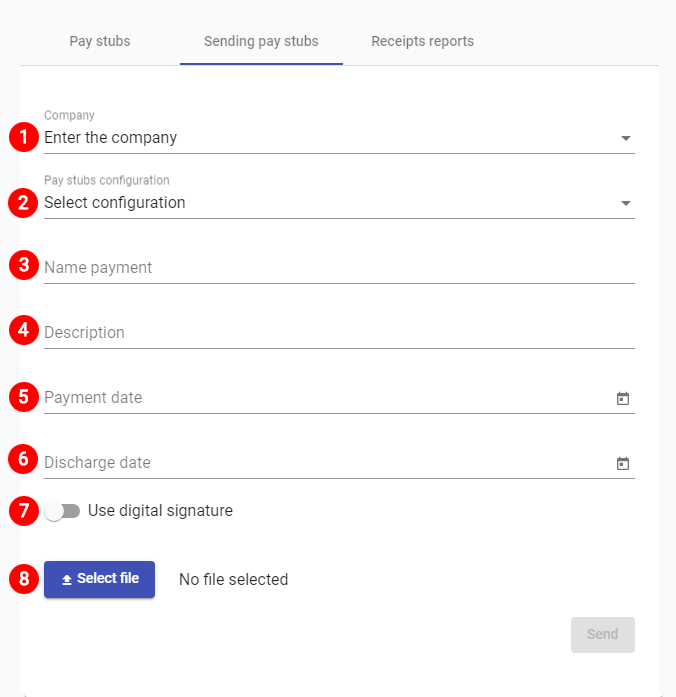
- Company: Company within the holding company to which the receipt is entered.
- Configuration: : Type of configuration of the receipt according to each holding. There will be a standard configuration, which contemplates the composition of data that allows the identification of each receipt with the corresponding file.
- Settlement number: It is a free text field, but it is suggested to indicate the settlement number that comes from CW.
- Name: Settlement description.
- Date of Payment: Date of payment of the generated settlement.
- Discharge Date: Here you can identify an additional date, which can be the date of discharge of the cover sheet or another date that is part of the process.
- Digital signature: Check mark to know if the receipt includes digital signature.
- Attach: The file(s) to be uploaded to the application.
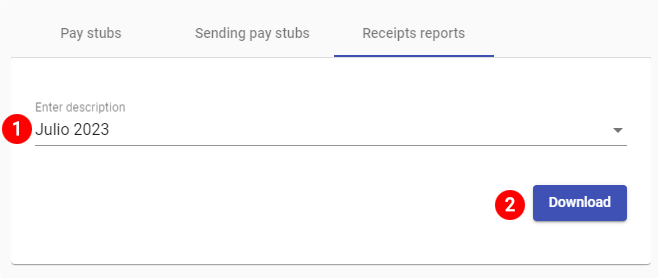
- Enter the payment number: Select the report you wish to export from among the available settlements.
- Download: Download report in xls format.